How Small Businesses Can Incorporate Accessibility Tools With a Tight Budget

Signapse

For many small business owners, “accessibility” sounds like a costly or complicated challenge reserved for big corporations. But in reality, making your workplace or customer experience more accessible doesn’t have to break the bank. With a bit of creativity and empathy, small businesses can make powerful changes that open their doors to a wider community, including Deaf and hard-of-hearing people, without spending a fortune.
Accessibility isn’t just about compliance. It’s about communication, connection and care. Today’s growing arsenal of digital tools showcases how it’s easier than ever to take meaningful steps on a tight budget. Let’s delve into how your small business can become an accessible haven.
- Why Accessibility Matters, Especially for Small Businesses
- Start with No-Cost, Policy-Based Changes
- Affordable AI and Video Accessibility Tools That Make a Big Impact
- The Power of AI Sign Language Translation
- Accessibility Beyond the Deaf Community
- A Practical Roadmap to Better Accessibility
- Inclusion is a Smart Investment
Why Accessibility Matters, Especially for Small Businesses
Accessibility is more than a legal box to tick. It’s a way to build trust and loyalty with your customers. Over 25,000 people use British Sign Language (BSL) as their first language in the UK and approximately 500,000 people use American Sign Language (ASL) as their native language in the US. This is a large community of potential customers, employees and collaborators who can benefit when communication barriers are reduced.
For small businesses, accessibility:
- Expands Your Audience: Captions, visual content and sign language translation reach both Deaf individuals and people who aren’t fluence in English.
- Boosts Morale and Inclusion: When employees feel seen and supported, retention and productivity improve.
- Strengthens Your Brand Reputation: Being inclusive shows customers that your business values people, not just profit.
And the best part? You don’t need a big budget to start. Accessibility begins with awareness and retention.
Exemptions and Legal Considerations for Small Businesses
In the UK, the Equality Act 2010 requires all businesses providing goods or services to the public to make “reasonable adjustments” for disabled people. This means the adjustments you make must be reasonable regardless of the costs, business size and nature of your business.
In the US, the rules are a little different. Under the ADA, businesses that are public accommodations such as retail stores, restaurants or hotels, must ensure equal access and take steps to communicate effectively with people with disabilities. There are, however, limited exemptions for certain very small or seasonal businesses. For example:
- Some businesses operating fewer than about 20 weeks per year may not fall under certain public-accommodation requirements.
- Other guidance also suggests businesses with fewer than 15 employees or other narrow criteria might have reduced obligations.
Nevertheless, it should be your main priority to make adjustments that promote an inclusive workplace. Afterall, a workplace that sees and hears its employees and customers is more likely to build loyalty.
Start with No-Cost, Policy-Based Changes
Before buying new software or devices, it’s important to start with simple cultural changes inside your business. Purchasing tools without using them correctly makes little difference. Starting from the inside out often costs nothing and makes an immediate difference.
1. Write a Simple Accessibility Statement
Put accessibility at the forefront of everyone’s mind. Create a simple document that outlines your commitment to inclusion and share it with your team and customers. It doesn’t need to be formal, just sincere and actionable.
2. Appoint an Accessibility Champion
Choose someone (even part-time) to learn about accessibility best practices. They don’t have to be a new hire either! This creates accountability and continuity for the practices you will put in place.
3. Encourage Open Communication
Make it easy for employees or customers to share their access needs. You could hold an accessibility meeting to hear what your employees need the most. This could be requesting captions in meetings or using video calls instead of messaging.
4. Offer Deaf Awareness and Communication Tips
There are many free resources online that teach basic Deaf culture etiquette:
- Face people when you speak
- Avoid covering your mouth
- Use gestures, facial expressions or writing when needed
- Learn a few signs! Even a simple “thank you” goes a long way.
5. Make Meetings Inclusive
Meetings are a time of pure collaboration. Make sure all your employees feel included by providing written agendas, taking notes collaboratively and recording key decisions in writing. Implementing sign language translation, whether this be AI or human, can also make all the difference!
Creating a more accessible space doesn’t have to cost you a penny. These simple changes can promote inclusion.
Affordable AI and Video Accessibility Tools That Make a Big Impact
Technology has opened new doors for accessibility and many tools are free or low-cost. Here are some practical ways small businesses can better support the Deaf community and beyond.
1. Live Captioning and Transcription
- Google Meet and Microsoft Teams offer built-in live captions at no extra cost.
- Online meetings also have plenty of note-taking solutions, such as Gemini, great for meetings or interviews.
- Zoom now includes auto-captioning on all plans, making online communication far more accessible.
2. Visual Alerts and Notifications
For in-person workplaces, simple visual cues can replace sound-based alerts:
- Use smart lights or apps that flash for incoming calls and even doorbells.
- Add visual announcements on noticeboards or internal communication platforms like Slack or Trello.
3. Sign Language Awareness Training
- Platforms such as Deaf Action, SignHealth and NDCS share free resources for learning basic BSL sign language and understanding Deaf culture. You can also find our guide to Deaf Culture for more information!
- To learn basic ASL, you could visit SignSchool or StartASL for free lessons.
- YouTube has excellent beginner tutorials in BSL and ASL.
The Power of AI Sign Language Translation
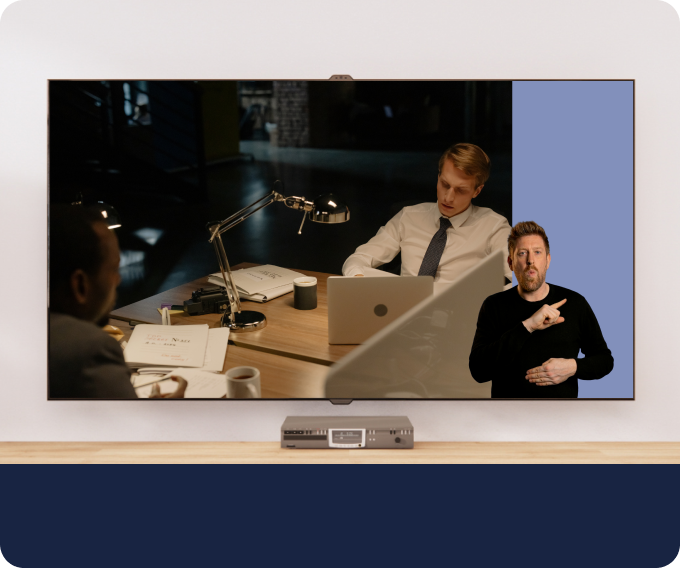
One of the most exciting developments in accessibility is the rise of AI-powered sign language translation tools. These innovations are helping bridge the communication between Deaf and hearing individuals in real time.
At Signapse, we offer both real-time and pre-recorded sign language translation, giving you flexibility when it comes to accessibility. Our products:
- Translate video, text and audio into sign language (BSL and ASL).
- Use AI-powered technology to generate on-screen human-like sign language interpreters for websites, videos and more.
- Assist with employee training and public communication where human interpreters may not be immediately available.
For small businesses, these tools can make day-to-day interactions easier. For example, translating your marketing content into sign language can reach a wider audience that is often forgotten about. While they aren’t a substitute for human sign language interpreters, these AI accessibility tools can help fill important gaps affordably and instantly.
AI translation tools are a promising bridge between the Deaf and hearing communities. They show customers and employees that your business values accessibility and innovation.
Accessibility Beyond the Deaf Community
The changes that help Deaf people often benefit others too. Accessibility means implementing measures that benefit everyone.
Simple additions you could also consider include:
- Adding alt text to website images so screen readers can describe visuals for blind users.
- Ensuring good colour contrast and readable fonts on your website and printed materials.
- Using plain, straightforward language to help neurodivergent people as well as non-native speakers.
- Offer quiet workspaces or flexible hours to accommodate employees with sensory sensitivities or mental health needs.
- Always captioning social media videos so users can still engage with your content even if they are scrolling with the sound off or are Deaf.
Implementing these changes creates a better experience for everyone, employees and customers alike!
A Practical Roadmap to Better Accessibility
If you’re unsure where to begin, here’s a simple step-by-step guide to making your workplace more accessible:
- Audit Your Current Accessibility: Check your office setup, communication habits and website and ask yourself, “Are there areas where someone might face barriers?”.
- Set One Small Goal Per Quarter: Start by making small changes like accessibility policy amends and slowly build up to more hard changes like adding sign language translation to your marketing videos or including sign language interpreters in meetings.
- Ask for Feedback: Invite employees and customers to share what helps them. You’ll often find simple fixes that make a big difference.
- Celebrate Progress: Don’t forget to celebrate the small wins along the way! Every improvement is one step closer to better accessibility.
Inclusion is a Smart Investment
You don’t need a large budget to make your business accessible. You just need awareness, creativity and heart. Whether it’s adopting AI accessibility tools, writing clear policies or making use of the free tools available to you, each small step builds a workplace and customer experience where everyone feels welcome.
Want to get started on your business accessibility journey? Why not try SignStream Chat and get your free 60 seconds of sign language translation, every week? It could be the perfect addition to an accessibility policy message or a marketing video!
FAQs
Do I need to hire a full-time interpreter for Deaf customers or employees?
Not necessarily! You can begin by offering written communication or sign language translation tools depending on your needs. If an employee or customer regularly needs sign language access, you may need to explore interpreter options.
How do I make my video accessible?
Captions are an easy way to make a video more accessible. But, there is more that can be done. AI sign language translation tools, such as SignStudio, can translate your videos into sign language, opening your content up to a wider audience. Remember, English or spoken language may not be the first language for a Deaf individual so captions may not be useful in this case!
With AI sign language translation tools available, can I skip hiring human interpreters?
AI accessibility tools are here to take the pressure off, but they are not a replacement for human interpreters. At Signapse, we recognise the need for human interpreters which is why we suggest using SignStream and SignStudio for marketing materials, onboarding content, livestreams and more. Treat our AI tools as a bridge, not a full substitute!
Related Articles
Making Your Videos Accessible: Translating Sign Language for a Broader Audience
Revolutionising Deaf Accessibility: Transform Your Website with Sign Language Translation
.png)