Creating Inclusive Content: Essential Accessibility Tools Explained

Chloe Tsang
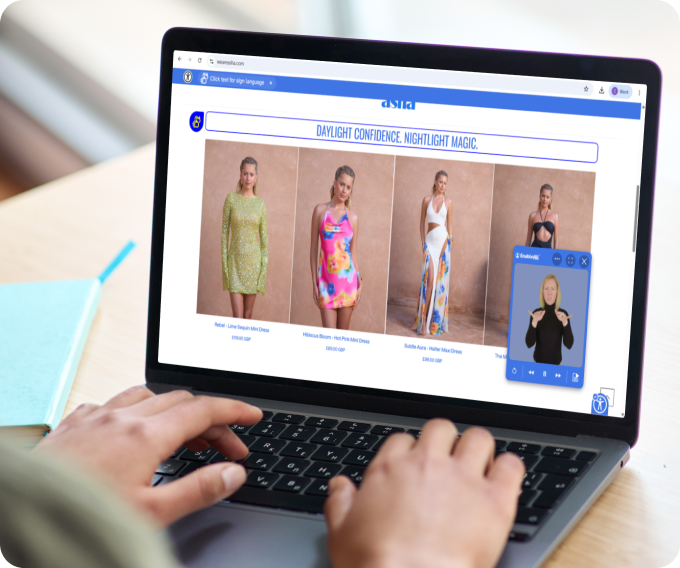
Digital accessibility is not a one-size-fits-all experience. Every individual has their own needs when it comes to online browsing.
These needs are further highlighted when users can’t clearly see, properly hear or easily understand the information businesses are offering. With accessibility tools, communication barriers can be removed and digital experiences can be made more inclusive.
There are many different digital accessibility tools out there that can best accommodate users' needs in various ways.
EnableAll aims to provide users with as many as possible with their accessibility widget. As the go-to e-commerce accessibility app for Shopify, EnableAll offers a personalised online shopping experience for any user.
From sign language translation tools to captions, screen readers, text adjustments, reading support tools, image descriptions and more, their accessibility tool not only provides users with customisations but also offers businesses a simple solution to meeting accessibility compliance requirements.
In this guide, we delve into a select few accessibility tools organisations should offer users to ensure effective communication that leaves no one behind.
1. Sign Language Translation Tools
There is often a wide debate as to why sign language translation on websites is needed if there is text present. English (or any other form of written language) is not always a first language for many sign language users. Sign language is!
This is why sign language translation is necessary as it means the Deaf community can easily access information in their own language, removing potential communication misunderstandings.
Signapse’s website sign language translation (available on EnableAll’s accessibility widget) works with users selecting their chosen sign language, with BSL or ASL currently available, and clicking on a block of text. One of our Digital Signers will pop-up on the corner of the screen with a clear and accurate sign language translation, allowing Deaf users to fully immerse themselves in a business’s website.
2. Captions
Managing a business means working with tight marketing budgets that sometimes rely on old content that wasn’t made with accessibility in mind. With a built-in video caption tool, users can benefit from video captioning on every video even if they weren’t created initially.
This solution removes communication barriers for the Deaf community, hard-of-hearing individuals and people with sensory sensitivities so they can get the most out of all your website content.
3. Screen Readers
One of the more popular and well-known accessibility tools, screen readers add an audio element to websites. Users can simply click on a block of text and a voice will read it out loud in a clear, human sounding voice.
This tool is particularly useful for people who have low vision, reading or learning difficulties and dyslexia.
4. Text Adjustments
Sometimes text can be full of waffle, especially when a business is trying to sell you a product. By simplifying text, readers can instantly see a clearer, simpler version of what the text is trying to say, without all the fluff.
Simplified text can make content more accessible for those with cognitive differences, learning disabilities, dyslexia and more.
5. Reading Support Tools
From a screen mask to a reading guide and reading ruler, there are many different reading support tools on the market that can be beneficial for individuals who struggle with reading on the typical white background websites usually use.
These tools can be useful for Dyslexia, ADHD, Autism and more, making reading content personalised to each individual.
6. Image Description
Websites are built to target all senses including sight. The use of images are prominent in websites, especially when it comes to e-commerce websites. But, not everyone can clearly see the intricacies of an image. Descriptive alt text enables screen readers to clarify images so all users can understand exactly what they are purchasing.
Alt text is particularly helpful for Blind users as well as those with low vision or anyone who uses screen readers.
Why Accessibility Should Be Built Into Your Website
We understand it takes time to thoroughly research and implement different accessibility tools to your website, especially when you want to be using the most appropriate tools. But, with an accessibility widget that packages all the accessibility tools you need in one place, accessibility is no longer a prolonged task but rather a simple, easy and effective solution.
With a growing pressure on businesses to comply with accessibility regulations, tools like EnableAll’s accessibility widget or Signapse’s website translation plug-in can make compliance easier, strengthening relationships with your audience and helping you grow your business.
Implement Sign Language Translation Today
The Deaf community is often left behind when it comes to website accessibility as myths such as “every Deaf individual can read English” facilitates communication barriers. With sign language translation, you can ensure the Deaf community has access to your website in their native language and fully understand what your business is all about.
For more information on our sign language translation technology, book a demo today and see how our AI translation tools can be used on your website.
FAQs
What are accessibility tools?
Website accessibility tools are features or technologies added to a website to make it usable for people with a range of disabilities, including visual, auditory and cognitive differences. Common examples include screen readers, reading support tools, captions and sign language translation tools.
How does a sign language translation tool work on a website?
At Signapse, our sign language translation tool for websites uses a Digital Signer to translate content into sign language. Simply activate the web accessibility tool, select your sign language and click on a block of text to watch our Digital Signers translate content clearly. Currently, we offer BSL and ASL but we have more sign languages on the way!
Do accessibility tools make a website fully WCAG compliant?
Accessibility tools can significantly improve a website’s compliance with Web Content Accessibility Guidelines (WCAG), but they alone do not guarantee full compliance. True accessibility requires a combination of good underlying code, thoughtful design and assistive tools working together.
Related Articles
Revolutionising Deaf Accessibility: Transform Your Website with Sign Language Translation
How Small Businesses Can Incorporate Accessibility Tools With a Tight Budget
7 Everyday Challenges the Deaf Community Face
.png)
.png)